Crypto Balance Tracker vs. Portfolio Tracker: What's the Difference?
Balance trackers show your balance. A portfolio tracker shows your profit. Here's what balance trackers miss, why it matters for your taxes, and how to tell the difference.
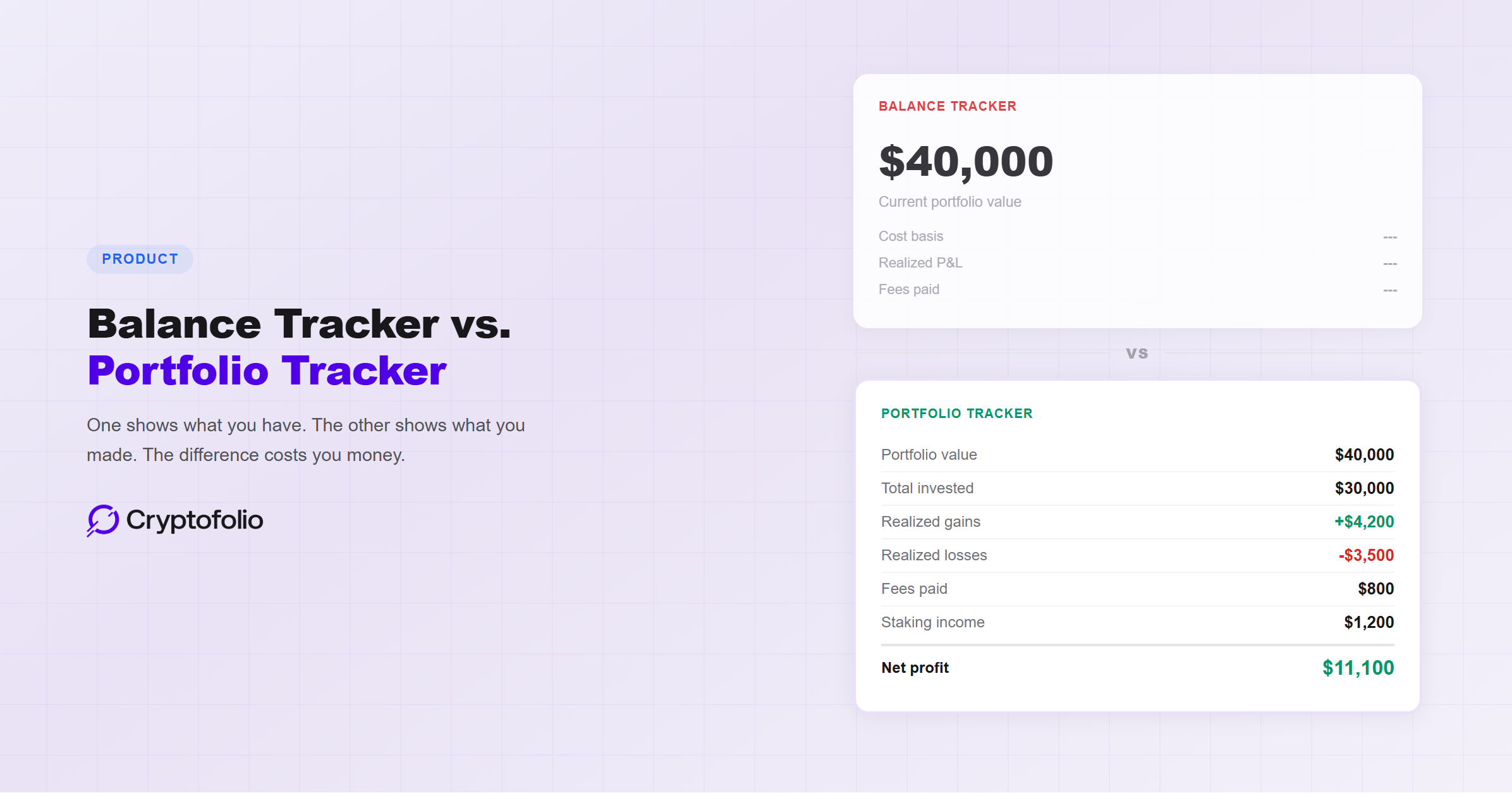
If you are using CoinGecko, CoinMarketCap, or DeBank to “track” your crypto portfolio, you are tracking your balance. You are not tracking your portfolio.
That is not a semantic distinction. It is the difference between knowing what your crypto is worth right now and knowing what you actually made. One number versus five. One snapshot versus a complete financial picture. And the gap between them is where most crypto investors make costly mistakes, from overpaying taxes to making sell decisions based on incomplete data.
The crypto market is full of apps that call themselves portfolio trackers. Most of them are balance trackers with a better interface. Understanding the difference will change how you think about your holdings.
What a Balance Tracker Does
A balance tracker connects to your wallets and exchanges and tells you the current market value of everything you hold. It fetches live prices, multiplies them by your token quantities, and gives you a total.
CoinGecko, CoinMarketCap, DeBank, Zerion, and even the native dashboards inside exchanges like Coinbase and Kraken are balance trackers. Some are more polished than others. DeBank and Zerion do an excellent job of reading on-chain DeFi positions. CoinGecko lets you manually build portfolios with entry prices and shows per-asset P&L. But none of them track lot-level cost basis, maintain per-wallet FIFO queues, capture fee data, record realized gains from closed trades, or link transfers between wallets. At their core, they all answer one question: what is my crypto worth right now?
That is useful information. Knowing your current net worth across wallets is important. But it is only one number in a set of numbers you need to make good decisions.
What a Balance Tracker Does NOT Do
A balance tracker does not tell you:
What you paid. Your cost basis, the original purchase price of each asset including fees, is not tracked. Without it, you cannot calculate whether you are actually up or down on any position.
What you made on trades you already closed. If you bought SOL at $20, sold it at $150, and rotated into ETH, that $130 per token gain is real profit. But the SOL is gone from your portfolio. A balance tracker shows zero SOL. The realized gain is invisible.
What you owe in taxes. Staking rewards, airdrops, and DeFi income are taxable as ordinary income when you receive them. A balance tracker shows these tokens in your holdings, but it does not record the fair market value at receipt, which determines both your tax liability and your cost basis for future sales. For a guide to what tracking DeFi positions actually requires, see our DeFi tracking guide.
How much you spent on fees. Gas fees, exchange fees, and slippage on DEX swaps are real costs that reduce your profit. A balance tracker does not track them. Over hundreds of transactions, cumulative fees can add up to thousands of dollars that simply vanish from your accounting.
Which lots to sell. Under the IRS's wallet-by-wallet rule (Revenue Procedure 2024-28), each wallet maintains its own FIFO lot queue. When you sell, the cost basis of the specific lot being consumed determines your taxable gain. A balance tracker does not track lots, so it cannot tell you whether selling from one wallet produces a $5,000 gain while selling from another produces a $15,000 gain on the same asset. For the full breakdown of how lot selection works, see our FIFO vs. LIFO guide.
The Danger of False Confidence
The real risk is not that balance trackers provide bad data. They provide accurate data about one thing: current value. The risk is that people treat that one number as if it tells the whole story.
Here is what that looks like in practice.
You open your app. It says your portfolio is worth $40,000. You feel good. You invested about $30,000, so you must be up $10,000, right?
Not necessarily. You forgot about the $3,500 in realized losses from trades that closed earlier in the year. You forgot about $800 in gas fees across 60 transactions. You forgot that $1,200 in staking rewards was already taxable as ordinary income when you received it. You forgot that 2 ETH in your MetaMask wallet was transferred from Coinbase, and the cost basis on those tokens is $1,500, not the $5,000 they were worth when you connected MetaMask. This is the start-from-connection problem that many apps get wrong.
Your actual net profit is not $10,000. It depends on numbers that a balance tracker never captured. You might be up $6,000. You might be up $12,000. You do not know, because the data was never collected. For a breakdown of the five most common reasons P&L ends up wrong, see our P&L tracker guide.
And when tax season arrives, the IRS does not accept “I think I'm up about $10,000.” They want Form 8949 with every transaction, cost basis, and gain or loss calculated to the penny.
What a Portfolio Tracker Does Differently
A portfolio tracker starts from a fundamentally different premise. Instead of asking “What is this worth right now?”, it asks “What happened to get here?”
It imports your complete transaction history from every connected exchange and wallet, going back to each wallet's creation date. Every buy, sell, swap, transfer, staking reward, airdrop, gas fee, and DeFi interaction is recorded with its date, value, and context.
From that complete history, it calculates:
Cost basis per lot, per wallet. Every acquisition creates a tax lot with a specific cost basis and date. Each wallet maintains its own lot queue under current IRS rules. When you sell, the tracker consumes the correct lot and calculates the exact gain or loss.
Realized gains and losses. Every completed trade has a definitive outcome. The tracker maintains a running total of realized P&L across all platforms, even for assets you no longer hold.
Unrealized gains and losses. For assets you still hold, the tracker knows both the current value and the original cost basis, so it can show your paper gains by position, by wallet, and in total. This is critical for tax-loss harvesting decisions.
Income tracking. Staking rewards, airdrops, and other income events are recorded at their fair market value on the date received. This becomes both the taxable income amount and the cost basis for future disposals.
Fee tracking. Every gas fee and exchange fee is captured as either a taxable disposition (gas fees) or a cost basis adjustment (exchange fees). No costs disappear from the record.
Transfer linking. When you move crypto between your own wallets, the tracker recognizes it as a transfer, not a sale, and carries the cost basis from the source wallet to the destination. Without this, every transfer looks like a disposal followed by an acquisition at zero cost.
The difference is not cosmetic. A balance tracker is a price lookup tool. A portfolio tracker is a financial record system. For a complete guide on what you need to connect for real tracking, including exchanges, wallets, DeFi positions, and why your full history matters, see our tracking guide.
A Side-by-Side Comparison
Here is the same portfolio viewed through both lenses.
The balance tracker gives you one number. The portfolio tracker gives you seven. And those six additional numbers are the ones you need for every meaningful financial decision: selling, rebalancing, harvesting losses, planning for taxes, and understanding whether your strategy is actually working.
How to Tell What You Are Using
If you are unsure whether your current tool is a balance tracker or a portfolio tracker, ask yourself these questions:
Does it show your cost basis for each asset? Not the current price. The price you paid when you bought it.
Does it show realized gains and losses from trades you already closed? Not just the current value of what you hold, but the outcome of transactions that are already finished.
Does it track gas fees and exchange fees as separate line items that affect your P&L?
Does it maintain lot-level data per wallet? Can you see which specific lots are in each wallet's queue?
Does it recognize transfers between your own wallets as non-taxable events and carry cost basis from one to the other?
If the answer to any of these is no, you are using a balance tracker. That does not mean the tool is bad. CoinGecko and DeBank are excellent at what they do. But what they do is show balances, not track portfolios.
For a complete breakdown of what each of these criteria means and how to apply them when evaluating a new tool, see our portfolio tracker buyer's guide. For a closer look at what the free tiers from popular trackers like CoinStats, DeBank, and Koinly actually include before hitting a paywall, see our breakdown of the limitations of free portfolio trackers. For a direct comparison of what CoinStats and DeBank each do and where they fall short on cost basis, see our how CoinStats and DeBank compare guide.
Where Cryptofolio Fits
Cryptofolio is a portfolio tracker. It imports your full transaction history from every connected exchange and wallet, maintains cost basis per lot and per wallet, tracks realized and unrealized P&L, captures every fee, and classifies staking rewards, airdrops, and DeFi interactions with their correct tax treatment.
When you open Cryptofolio, you see your balance. But you also see what you paid, what you made, what you lost, and what you owe. All of it updated in real time, not reconstructed once a year.
Your balance tells you what you have. Your portfolio tracker tells you whether it's working.
Cryptofolio tracks cost basis, P&L, fees, and income across every wallet and exchange, so you always know your real position.
The Bottom Line
A balance tracker tells you what your crypto is worth. A portfolio tracker tells you what your crypto did. One is a snapshot. The other is a complete financial record.
For a deeper look at what your portfolio app is not showing you and why the gap between balance and profit can be thousands of dollars, see our guide on what your portfolio app is not telling you. For a focused look at how to calculate your actual crypto profit and why the number is harder to find than it looks, see our guide on how much you really made in crypto.
If you hold crypto on a single exchange and have never moved it, traded it, or earned income from it, a balance tracker might be all you need. For everyone else, the gap between knowing your balance and knowing your profit is a gap filled with overpaid taxes, missed harvesting opportunities, and decisions made on incomplete information.
The tools you use shape the decisions you make. Make sure yours are giving you the full picture.
Disclaimer: This article is for informational purposes only and does not constitute legal, tax, financial, or investment advice. Consult a qualified professional for advice on your individual circumstances.