CoinStats vs DeBank vs Cryptofolio: What Each Tracker Actually Does
CoinStats tracks balances across 300+ exchanges and wallets. DeBank tracks DeFi across 1,300+ protocols. Cryptofolio tracks cost basis per lot, per wallet, across every chain. Here's what each one actually does.
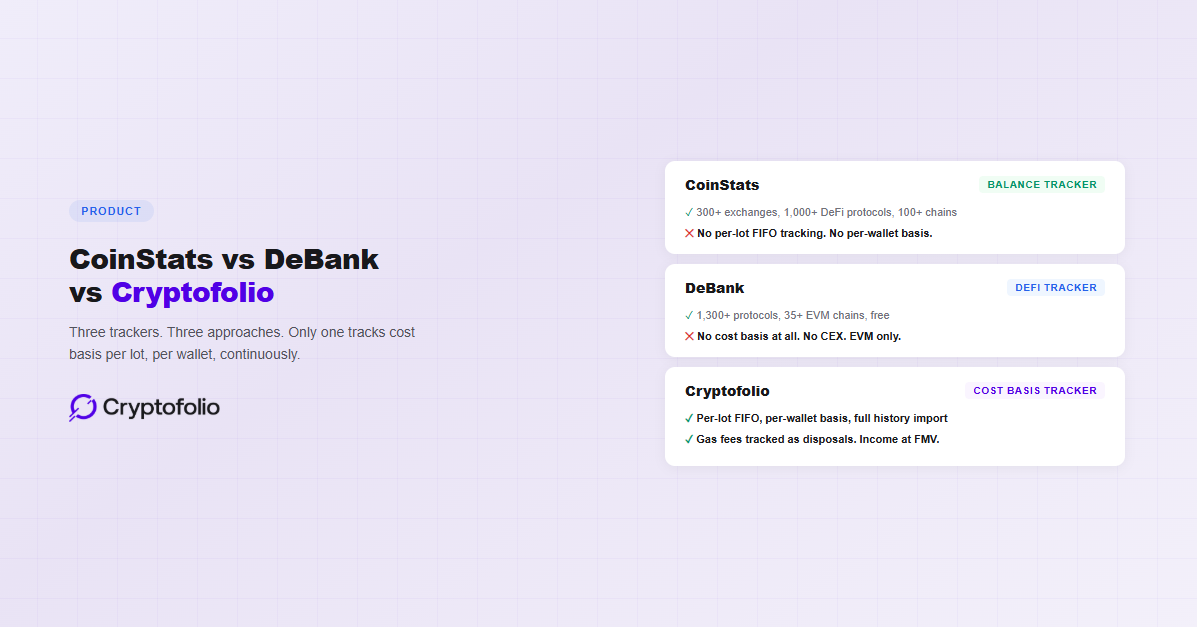
CoinStats is the widest portfolio tracker on the market. DeBank is the deepest DeFi tracker. Both are good at what they do. Neither of them tracks cost basis at the per-lot, per-wallet level that accurate portfolio accounting requires.
That is not a minor feature gap. Per-lot cost basis is the difference between an approximate P&L and an accurate one. Without it, your portfolio dashboard may show a profit number, but that number does not account for which specific lots were sold, what you paid for each one, or how transfers between wallets affected your basis.
This post compares all three trackers on what they actually do, where each one is strongest, and where each one falls short. No rankings. No scores. Just what you get and what you do not.
CoinStats: The Broadest Dashboard
CoinStats supports over 300 wallets and exchanges, 1,000+ DeFi protocols, and 100+ blockchains. That is the highest integration count of any portfolio tracker on the market. If you hold crypto across multiple centralized exchanges and want to see everything on one screen, CoinStats is the most likely tool to support all of your accounts.
The free Basic plan includes 10 portfolios, 20,000 transactions, and 10 daily syncs per portfolio. You get basic portfolio tracking, token risk scores, and a Time Machine feature that shows historical snapshots of your portfolio value.
What is paywalled: Profit and Loss analytics, custom alerts, portfolio heatmap, asset allocation breakdowns, fee analysis, and an ad-free experience. Premium starts at $13.99/month billed annually. The Degen tier for power users runs $62.91/month.
CoinStats also offers in-app swaps, an AI-powered exit strategy tool, and a crypto news feed. These are useful add-ons for active traders who want everything in one app. The platform has strong mobile apps with 4.8 stars on the App Store (153,000 reviews) and 4.7 on Google Play.
Where CoinStats falls short is the depth of its cost basis tracking. CoinStats Premium does calculate P&L, including realized gains, unrealized gains, and total cost. These are useful metrics. But the calculation operates at the aggregate level per asset, not at the per-lot level. If you bought ETH in three separate transactions at three different prices, CoinStats tracks your total cost and your current value, but it does not maintain each purchase as a distinct tax lot with its own basis, acquisition date, and holding period. It does not apply FIFO ordering per wallet as required under Rev. Proc. 2024-28.
The P&L features are also paywalled. The free Basic plan does not include Profit and Loss analytics. You need Premium ($13.99/month billed annually) or higher to access them.
For users who buy and hold on centralized exchanges, CoinStats’ aggregate P&L may be close enough. For anyone with DeFi activity, cross-chain transfers, or multi-wallet holdings, the P&L numbers will diverge from a per-lot calculation over time because cost basis is not tracked at the granularity that complex portfolios require. For a full breakdown of why aggregate P&L diverges from lot-level tracking, see our P&L tracker guide.
It is also worth noting that CoinStats experienced a security breach in June 2024 that affected some CoinStats Wallets, with reported losses of approximately $2.2 million. The platform uses read-only API connections for portfolio tracking, which limits risk, but the incident is relevant context for anyone evaluating where to connect their exchange accounts. For a full breakdown of how this breach happened and what it means for hosted wallet risks, see our crypto tracker security guide.
DeBank: The Deepest DeFi View
DeBank is a free DeFi portfolio tracker covering 35+ EVM-compatible blockchains and 1,300+ protocols. It automatically detects staking positions, LP tokens, lending positions, and protocol-level data. For DeFi-heavy users, DeBank provides a level of protocol coverage that no other free tool matches.
The platform does not require a wallet connection to use. You can paste any Ethereum (or EVM) wallet address into the search bar and see the full portfolio. This makes DeBank useful for personal tracking and for researching other wallets, which is why it is popular among whale watchers and DeFi analysts.
DeBank’s social layer is a differentiator. The platform includes a Twitter-like feed called Stream, wallet-to-wallet messaging, and follower tracking ranked by Total Value of Followers (TVF). Social features beyond basic use require minting a Web3 ID ($96 one-time). DeBank also developed the Rabby Wallet, which integrates directly with DeBank’s data for seamless tracking.
Where DeBank falls short is everything outside of DeFi on EVM chains. It does not natively support centralized exchanges. Bitcoin, Solana, and other non-EVM ecosystems are not covered in the core product. An “Analysis Mode” can monitor some exchange activity, but it is not full CEX portfolio tracking.
More critically, DeBank does not track cost basis at all. It shows what you hold and what it is worth right now. It does not know what you paid for any of those assets. It does not calculate realized or unrealized gains against your purchase price. It does not track gas fees as disposals. And it does not produce any tax-related output.
DeBank is a balance viewer with protocol-level depth. It tells you what you have and where it sits. It cannot tell you what you made. For a broader look at what separates a balance viewer from a tool that actually tracks your portfolio, see our guide on crypto balance trackers vs. portfolio trackers.
What Both Trackers Miss
CoinStats and DeBank approach portfolio tracking from opposite directions. CoinStats starts with breadth: connect everything, see your total balance. DeBank starts with depth: see exactly what is happening inside every DeFi protocol on EVM chains.
Both approaches produce a dashboard that shows your current holdings. Neither produces a dashboard that shows your actual profit.
The gap comes down to three things.
First, neither tracker maintains per-lot cost basis with FIFO ordering. When you buy ETH across five transactions at five different prices, you have five tax lots. Each lot has its own cost basis, its own acquisition date, and its own holding period. When you sell, FIFO determines which lot gets consumed first, and the gain or loss depends on which specific lot you are selling. CoinStats calculates aggregate P&L but does not track individual lots. DeBank does not calculate gains at all. For the full explanation of how lot selection works under current IRS rules, see our FIFO vs. LIFO guide.
Second, neither tracker follows cost basis through transfers. When you move ETH from Coinbase to MetaMask to Aave, your cost basis should follow. The ETH in Aave should still carry the original purchase price from Coinbase. Both CoinStats and DeBank see the asset arrive at the new location, but they do not link it to the original acquisition. That link is what makes P&L accurate.
Third, neither tracker treats gas fees as what they are: taxable disposals that consume lots from your FIFO queue. Every gas fee you pay in ETH is a disposition of ETH. It has a cost basis (the FIFO lot consumed) and a gain or loss (the difference between that basis and the market value at the time you paid the fee). Neither CoinStats nor DeBank tracks this at the lot level.
These are not niche requirements. They are what separates a balance display from a portfolio tracker that can actually tell you what you made.
Cryptofolio: Cost Basis as the Core
Cryptofolio is built around the principle that cost basis is not a tax problem solved once a year. It is a portfolio problem solved continuously. Every trade, transfer, bridge, swap, staking reward, and gas fee updates a ledger that tracks what you paid and what you made in real time.
The core difference is structural. CoinStats and DeBank pull data from your connected accounts and display balances and, in CoinStats’ case, aggregate P&L. Cryptofolio pulls your complete transaction history back to wallet creation, classifies every event, and maintains a per-lot, per-wallet cost basis that updates with every new transaction.
What this means in practice: when you move ETH from Coinbase to MetaMask and then deposit into Aave, Cryptofolio links the entire chain. The cost basis from your original Coinbase purchase follows through every step. When you eventually withdraw and sell, the gain is calculated against what you actually paid, not what the asset was worth when it arrived at each stop.
Staking rewards, lending interest, and airdrops are classified as income at FMV at the time of receipt. Each one creates a new tax lot in the receiving wallet’s FIFO queue. Gas fees are tracked as separate disposals with their own gain or loss calculations.
For DeFi, Cryptofolio decodes protocol-specific mechanics. Aave aToken balance increments, Uniswap v3 NFT positions, Lido stETH rebases, and Curve gauge emissions each have their own smart contract architecture. Cryptofolio interprets each one according to its on-chain behavior rather than applying a generic balance-diff approach. For a deeper look at what DeFi tracking actually requires, see our DeFi tracking guide.
If a protocol is not yet supported, Cryptofolio flags the transaction for review so you can classify it manually. Once support is added, the manual entry is automatically replaced with verified on-chain data, typically within 12 to 24 hours.
Cost basis tracking per lot, per wallet, is also what the IRS now requires. Rev. Proc. 2024-28 mandates wallet-by-wallet basis tracking. Cryptofolio tracks at this level natively. That means the same data that shows you your accurate P&L is also the data you need if you ever file taxes, respond to a notice, or hand your records to an accountant.
Side-by-Side Comparison
Here is what each tracker offers across the categories that matter for knowing your real portfolio performance.
1. Historical import
CoinStats: API history; Fill transactions for gaps
DeBank: Current balances only
Cryptofolio: Full on-chain history from wallet creation
2. Per-lot cost basis
CoinStats: Aggregate P&L per asset; no individual lots
DeBank: No cost basis tracking
Cryptofolio: Per lot with FIFO ordering
3. Per-wallet FIFO queues
CoinStats: No per-wallet lot separation
DeBank: No gain calculations
Cryptofolio: Independent FIFO queues per wallet
4. Cost basis through transfers
CoinStats: Transfer chains not linked
DeBank: Transfers not tracked at cost basis level
Cryptofolio: Send and receive sides linked to maintain basis
5. Gas fees as disposals
CoinStats: Not tracked as separate disposals
DeBank: Not tracked at lot level
Cryptofolio: FIFO disposals with gain or loss calculation
6. DeFi protocol coverage
CoinStats: 1,000+ protocols, balance tracking
DeBank: 1,300+ protocols, balance and position tracking
Cryptofolio: Growing protocol list with per-lot cost basis; unsupported protocols flagged for review
7. CEX support
CoinStats: 300+ exchanges
DeBank: Limited via Analysis Mode
Cryptofolio: Major exchanges with full transaction history import
8. Blockchain support
CoinStats: 100+ blockchains
DeBank: 35+ EVM chains
Cryptofolio: Ethereum, Avalanche, Base, BSC, Solana, Bitcoin
9. Staking reward classification
CoinStats: Tracks rewards; partners with third-party tax tools for income classification
DeBank: Does not classify rewards
Cryptofolio: Ordinary income at FMV; new per-wallet tax lots; no third-party dependency
10. Free tier
CoinStats: Free plan (10 portfolios, 20,000 TX, ad-supported)
DeBank: Free for portfolio tracking ($96 for social features)
Cryptofolio: Free Starter tier with basic portfolio tracking
11. Pricing
CoinStats: Premium from $13.99/month
DeBank: Free for tracking
Cryptofolio: Free basic tier; paid tiers for cost basis features
Which One Should You Use
CoinStats is the right choice if your priority is seeing everything in one place. You trade on multiple centralized exchanges, you want price alerts, you want AI exit strategies, and you do not need precise cost basis or per-lot tracking. The breadth of integrations is unmatched. If you are a buy-and-hold investor using mainstream exchanges, CoinStats gives you the widest view of your holdings.
DeBank is the right choice if your activity is primarily DeFi on EVM chains. The protocol coverage and position-level detail are the best available for free. If you want to know exactly what you have deposited in Aave, what your LP position looks like on Curve, and what a specific whale is doing across 20 protocols, DeBank is the tool for that job. Just know that it will not tell you what you paid for any of it.
Cryptofolio is the right choice if you need to know what you actually made. If you have activity across wallets, exchanges, and DeFi protocols, and you want a P&L that reflects what you paid rather than what the assets are worth today, Cryptofolio is built for that. The integration count is smaller than CoinStats or DeBank, but every supported integration includes full cost basis tracking. That is a different product than a balance dashboard with wider coverage.
The decision depends on what question you are trying to answer. If the question is “what do I hold,” CoinStats or DeBank will answer it. If the question is “what did I make,” you need cost basis tracking. For a framework on evaluating any tracker across the criteria that separate real portfolio tracking from balance aggregation, see our portfolio tracker buyer's guide.
Balance is what you have. Profit is what you made. Know both.
Cryptofolio tracks cost basis per lot, per wallet, across every chain, so you always know the real number behind the balance.
The Bottom Line
CoinStats and DeBank are both strong products for what they do. CoinStats gives you the broadest dashboard. DeBank gives you the deepest DeFi view. If all you need is a balance display, either one will serve you well.
The gap is cost basis. Without it, your P&L is a guess based on current asset prices, not a calculation based on what you paid. That distinction does not matter if you are casually checking your portfolio once a week. It matters a great deal if you are making investment decisions based on those numbers, or if you ever need to report your gains accurately.
Cryptofolio approaches portfolio tracking from the cost basis layer up. That is a fundamentally different product than a balance aggregator, regardless of how many integrations the aggregator supports. For a look at what that difference means in practice across the full range of trackers on the market, see our guide on what a crypto portfolio tracker actually does. For a comparison of how Koinly and CoinTracker differ from both balance trackers and Cryptofolio, see our Koinly vs CoinTracker vs Cryptofolio guide. For a breakdown of what free tiers from all major trackers actually include before hitting a paywall, see our guide on the real cost of free crypto portfolio trackers.
Disclaimer: This article is for informational purposes only and does not constitute legal, tax, financial, or investment advice. Product features and pricing described are accurate as of April 2026 and may change. Consult a qualified professional for advice on your individual circumstances.