The Real Cost of Free Crypto Portfolio Trackers
Free crypto portfolio trackers show your balance. They don't show what you actually made. Here's what the free tiers from CoinStats, DeBank, Koinly, CoinTracker, and Summ actually include, and what they leave out.
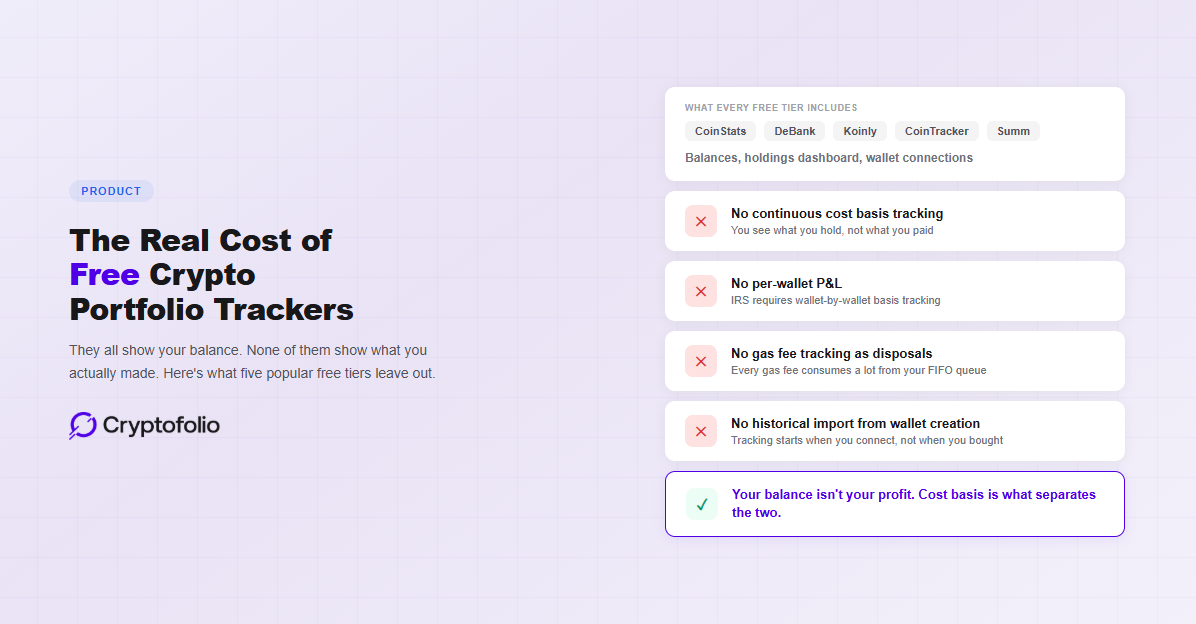
There are dozens of free crypto portfolio trackers. Most of them do the same thing: connect your wallets, pull your balances, and show you a number at the top of the screen. That number is your balance. It tells you what your crypto is worth right now. It does not tell you what you paid for it, what you have spent in fees, or whether you have actually made money. For that, you need cost basis tracking. And that is where free tiers stop.
This is not a knock on free tools. They serve a purpose. If all you want is a dashboard that shows your holdings across wallets and exchanges, a free tracker will do that. The problem starts when you assume that dashboard is giving you the full picture. It is not. Your balance and your profit are two different numbers, and in most cases, they are not even close.
Here is what the free tiers from five of the most popular tools actually give you, what they leave out, and why it matters.
CoinStats
CoinStats is a portfolio tracker with over a million monthly users. The free Basic plan lets you connect up to 10 portfolios with 20,000 transactions and 10 daily syncs per portfolio. You get basic portfolio tracking, token risk scores, and a feature called Time Machine that shows historical snapshots.
What is missing on the free plan: Profit and Loss analytics, custom alerts, portfolio heatmap, asset allocation breakdowns, and fee analysis. The free tier is also ad-supported.
The bigger issue is not what is paywalled. CoinStats tracks balances well, but it is not built around cost basis. It can show you what your portfolio is worth and how the value has changed, but it does not maintain a per-lot cost basis across wallets the way a tax-compliant system requires. If you have transferred crypto between exchanges or used DeFi, the numbers on screen may not reflect your actual profit. For a full breakdown of why balance tracking and profit tracking are different things, see our balance tracker vs. portfolio tracker guide.
CoinStats Premium starts at $13.99/month (billed annually). The Degen tier for heavier users runs $62.91/month.
It is also worth noting that CoinStats experienced a security breach in June 2024 that affected some CoinStats Wallets, with reported losses of approximately $2.2 million. The platform uses read-only API connections for portfolio tracking, which limits exposure, but the incident is relevant context for anyone evaluating where to connect their accounts. For what to check before connecting any tracker to your exchange accounts, see our guide on crypto tracker security.
DeBank
DeBank is the strongest free DeFi portfolio tracker available. It covers 35+ EVM-compatible blockchains and 1,300+ protocols, and it detects staking positions, LP tokens, lending positions, and protocol-level data automatically. For DeFi-heavy users who want to see everything in one place, DeBank is hard to beat on breadth.
The limitations are structural. DeBank is EVM-only, so Bitcoin, Solana, and non-EVM chains are not supported in the core product. It also does not natively integrate with centralized exchanges. An Analysis Mode can monitor some exchange activity, but it is not equivalent to full CEX portfolio tracking.
More importantly, DeBank does not track cost basis at all. It shows your current balance and your current DeFi positions. It does not know what you paid for any of those assets. It does not calculate realized or unrealized gains. It does not track gas fees as disposals. It does not produce tax-ready output.
DeBank is a balance viewer with excellent DeFi depth. If you want to know what you hold across protocols, it is one of the best free options available. If you want to know what you actually made, it cannot tell you. For more on what separates a balance viewer from a tool that tracks your portfolio, see our guide on what a crypto portfolio tracker actually does. For a head-to-head look at how CoinStats and DeBank specifically compare to Cryptofolio’s cost basis tracking, see our CoinStats and DeBank comparison.
The platform is free for portfolio tracking. Social features are gated behind a Web3 ID that costs $96 as a one-time mint.
Koinly
Koinly is a tax tool, not a portfolio tracker, but its free tier includes portfolio features that make people use it as one. The free plan lets you import unlimited transactions (up to 10,000 before calculations pause), connect unlimited wallets and exchanges, track portfolio performance, and see a preview of your estimated capital gains.
The catch: you cannot download tax reports. The free tier is designed to let you verify that the platform works with your data before you pay. Downloading Form 8949, Schedule D, or any formatted tax output requires a paid plan starting at $49/year for up to 100 transactions. Heavier users will pay $99 (1,000 transactions), $179 (3,000), or $279 (10,000+).
There is also a structural cost that is not obvious upfront. Koinly uses an account-wide transaction limit. Transactions from previous tax years count toward your total. If you have been in crypto for several years and you import your full history, prior-year transactions can push you into a higher tier for the current year. The effective cost of Koinly increases over time as your transaction count accumulates, even if your recent activity is minimal.
As a portfolio tracker, Koinly's free tier is functional. You can see your holdings, your estimated gains, and your transaction history across wallets. But the platform is fundamentally designed to produce tax reports, and everything is optimized around that workflow. Year-round portfolio monitoring, real-time P&L, and performance analytics are secondary to the tax filing flow.
CoinTracker
CoinTracker is the competitor most often confused with a portfolio tracker. It offers a free plan with unlimited transaction imports, portfolio tracking, and a basic tax summary dashboard. Like Koinly, you can connect wallets and exchanges and see your holdings in one place.
The free plan does not include downloadable tax forms, performance tracking features, tax loss harvesting tools, or priority support. To download Form 8949 or any official tax report, you need at least the Base plan at $59/year (100 transactions). The Prime plan at $199/year (1,000 transactions) adds tax loss harvesting and performance analytics. The Ultra plan runs $599/year for up to 10,000 transactions.
CoinTracker's biggest advantage is distribution. It has a partnership with Coinbase and was the first platform to announce full 1099-DA lifecycle support. For users who trade primarily on Coinbase, the integration is seamless. For users with activity across multiple wallets, chains, and DeFi protocols, the experience is less smooth. User reviews consistently cite issues with missing or incorrect imports, particularly for transfers between wallets and complex DeFi interactions.
Like Koinly, CoinTracker reconstructs your cost basis after the fact. You connect your accounts at tax time, it pulls your history, and it tries to piece together what you paid. If the import misses a transfer or misclassifies a transaction, your cost basis breaks silently. You may not realize it until you are looking at a tax number that does not match reality. For a direct comparison of how Koinly and CoinTracker differ from a dedicated portfolio tracker, see our Koinly vs CoinTracker vs Cryptofolio guide.
Summ (formerly Crypto Tax Calculator)
Summ is MetaMask's integrated tax partner, which gives it a distribution advantage with MetaMask's massive user base. The free tier lets you view transactions but requires a paid plan to generate reports.
Summ is primarily a tax tool. Its value proposition is similar to Koinly and CoinTracker: connect your wallets, import your history, generate your tax forms. The MetaMask integration makes onboarding simpler for users who already have a MetaMask wallet, but the underlying approach is the same retroactive reconstruction model.
For portfolio tracking specifically, Summ's free tier offers less than CoinStats or DeBank. It is built for tax output, and the portfolio view is a supporting feature rather than the core product.
What All Five Have in Common
Every free tier in this list does the same thing well: it shows your balances. Some do it better than others. DeBank has the deepest DeFi coverage. CoinStats has the broadest CEX and wallet support. Koinly and CoinTracker let you see estimated gains.
None of them maintain continuous cost basis tracking on the free tier. That is the gap.
When you DCA into ETH over 12 months and the price goes from $2,000 to $3,000, a balance tracker shows you the asset is up 50%. Your actual return on invested capital is closer to 22%, because your later buys had less time to appreciate. The tracker shows the asset's performance. Not yours. For a deeper look at how this gap affects the number on your screen, see our guide on what your portfolio app is not telling you.
When you bridge crypto from Ethereum to Avalanche, a balance tracker sees tokens arrive on a new chain. It does not know what you paid for them. When you eventually sell, the tracker either reports zero cost basis, overstating your gain, or uses the market price at arrival, understating it.
When you pay gas fees on dozens of DeFi transactions, those fees are taxable disposals that consume lots from your FIFO queue. A balance tracker does not track this at all. The gas is just gone.
And what happens when a DeFi protocol you use gets exploited is not tracked at all by free tools. When a protocol is paused or drained, your dashboard may show no change even as your tokens sit in a frozen contract or have been moved to an attacker's wallet. The balance looks the same. The tokens are not accessible.
These are not edge cases. They are the normal experience for anyone with activity across more than one wallet or chain.
What Continuous Tracking Changes
The alternative to retroactive reconstruction is continuous tracking. Instead of connecting your wallets once a year and hoping the import captures everything, a continuous tracker maintains your cost basis as you go. Every trade, transfer, bridge, and fee updates your ledger in real time.
This means your P&L is always current. Your unrealized gains are based on what you actually paid, not what the asset costs today. Your realized gains account for every lot consumed, including gas fee disposals. And when tax season arrives, the work is already done.
Cryptofolio is built around this approach. Cost basis is tracked per lot, per wallet, across chains, continuously. The free Starter tier provides basic portfolio tracking to demonstrate that the product works. Cost basis and P&L are available on paid tiers, because that is where the actual value is.
The question is not whether a free tracker can show your balance. They all can. The question is whether you know what you actually made. For most people using free tools, the answer is no. For a framework on evaluating trackers that maintain this data correctly, see our portfolio tracker buyer's guide. For a full breakdown of what accurate tracking actually requires, including what to connect and how to verify your numbers are right, see our tracking guide.
Your balance is not your profit. Know the difference.
Cryptofolio tracks cost basis per lot, per wallet, across every chain, continuously. So when you need the real number, it is already there.
The Bottom Line
Free crypto portfolio trackers are useful for what they do. If you want a dashboard that shows what you hold and what it is worth right now, there are good options available at no cost.
The cost of using a free tracker is not the price tag. It is what you do not see. Missing cost basis means your profit number is wrong. Wrong profit means wrong tax reporting. Wrong tax reporting means either overpaying or getting a notice from the IRS.
If your crypto activity is limited to buying and holding on a single exchange, a free tracker may be enough. If you have ever transferred between wallets, used DeFi, bridged between chains, or traded on more than one platform, you need cost basis tracking. And right now, none of the free tiers on the market provide it.
Disclaimer: This article is for informational purposes only and does not constitute legal, tax, or financial advice. Cryptocurrency tax rules are complex, depend on your specific situation, and are subject to frequent regulatory changes. Product features and pricing described are accurate as of April 2026 and may change. Consult a qualified tax professional for advice on your individual circumstances.