How to Track Your Crypto Portfolio the Right Way
Most portfolio trackers show your balance and call it tracking. Real tracking means knowing what you paid, what you made, and what you owe. Here's what to connect, what to check, and how to tell if your numbers are actually right.
Open your portfolio app right now. You see a number. Maybe it says $23,000 or $4,700 or $112,000. That number is your balance. It tells you what your crypto is worth at this moment.
It does not tell you what you paid for it. It does not tell you how much you made. It does not tell you what you owe in taxes or how much you lost to fees along the way. Most people look at that number and assume they know where they stand. They don't.
Real portfolio tracking means connecting every account and wallet, importing your full transaction history, and maintaining accurate cost basis through every trade, transfer, and DeFi interaction you've ever made. That is a different thing from checking your balance, and confusing the two is where most crypto investors go wrong.
What “Tracking” Actually Means
Checking your balance is not tracking your portfolio. Your balance tells you the current market value of what you hold. Tracking tells you the full financial picture: what you invested, what you spent on fees, what you earned from staking or airdrops, what you realized when you sold, and what your actual net return is after all of it.
Here is the difference in practice. You bought ETH across three exchanges over two years. You transferred some to MetaMask, swapped part of it on Uniswap, staked some on Lido, and bridged the rest to Arbitrum. Your portfolio app shows 2.4 ETH worth $7,200.
That number is correct. But it doesn't tell you that you paid $8,100 total for the ETH you currently hold, which means you're actually down $900. It doesn't account for the $340 in gas fees you paid across those transactions or the 0.12 ETH you earned from staking that's sitting in a different wallet. Without tracking all of that, you don't know whether you're profitable. You just know what the ETH is worth today.
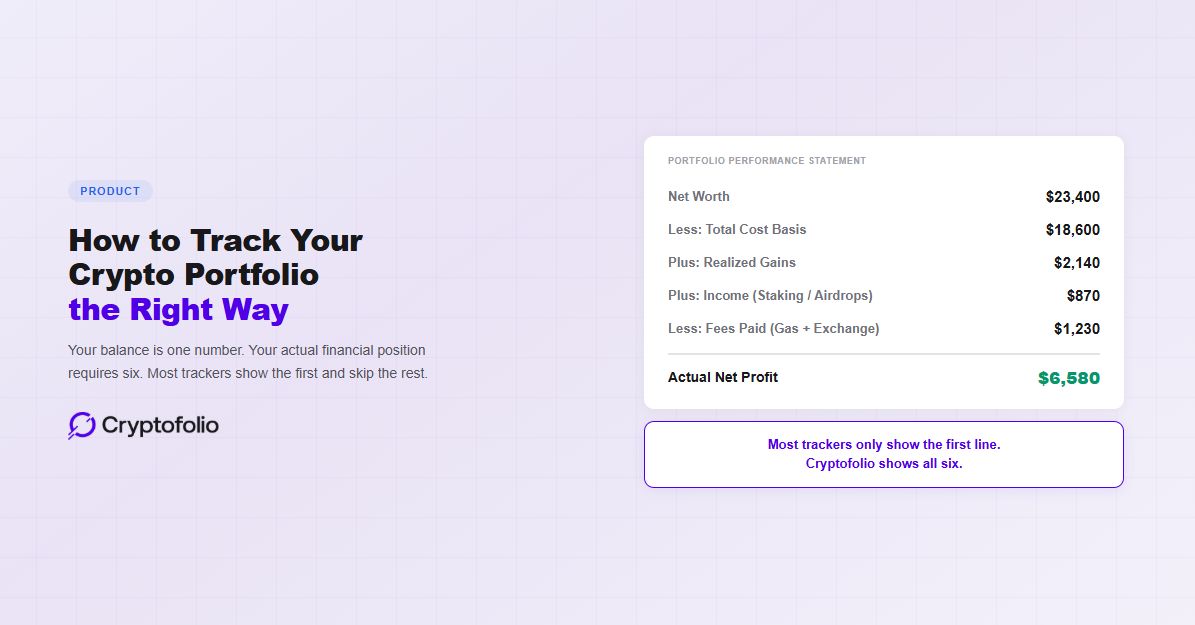
A real portfolio tracker shows you six numbers: your current net worth, your total cost basis, your net profit or loss, your realized gains from past sales, income earned from staking and airdrops, and total fees paid. (We broke down why each of these matters in our guide to why your crypto P&L is wrong.) If your tracker only shows the first one, it is giving you 16% of the picture.
What You Need to Connect
Accurate tracking starts with connecting everything. Not just your main exchange account. Everything.
Your centralized exchange accounts are the easiest to connect. Coinbase, Kraken, Binance, or wherever you buy and sell. Each one has its own transaction history, its own fee schedule, and its own records of what you paid. If you traded on three exchanges over two years, you need all three connected. A tracker working from only one exchange is missing every trade you made on the other two, and your cost basis will be wrong from the start.
Your on-chain wallets come next. MetaMask, Ledger, Trust Wallet, Phantom, Core. Each wallet address holds its own transaction history on the blockchain. If you transferred crypto from Coinbase to MetaMask, both sides of that transfer need to be visible to your tracker. Otherwise it looks like crypto disappeared from one place and appeared from nowhere in another, and the cost basis that should have followed the asset gets lost. (We covered exactly how this breaks in our guide to how transfers break your cost basis.)
Your tracker also needs to work across chains. If you hold ETH on Ethereum, SOL on Solana, AVAX on Avalanche, and BTC on Bitcoin, a tracker that only covers one or two of those chains is showing you a partial portfolio. Worse, if you bridged assets between chains, a single-chain tracker has no way to connect the send on one chain to the receive on the other. Your cost basis breaks at the bridge and every number after it is wrong. (We wrote about exactly how bridging breaks tracking in our crypto bridge cost basis guide.)
DeFi positions are where most trackers stop working. If you deposited ETH into Aave, provided liquidity on Uniswap, staked on Lido, or farmed yield on Curve, each of those protocols generated transactions that your tracker needs to classify correctly. A deposit into Aave is not a sale. An LP withdrawal is not a purchase. If your tracker misclassifies these, your P&L will show gains or losses that never actually happened. (For a deeper look at how DeFi breaks cost basis, see our DeFi cost basis guide.)
Staking and income sources are often completely invisible. Staking rewards on Ethereum generate hundreds of tax lots per year, each with its own cost basis at fair market value when received. If your tracker doesn't record these, you're missing income and your cost basis on those tokens is wrong. Airdrops are the same problem. (We covered the staking tracking problem specifically in our staking rewards guide.)
Your full history matters, not just activity from the day you connected. This is the one that catches most people. If a tracker starts recording from the day you connect, every asset you already hold gets assigned a cost basis of $0 or the current price. Neither is correct. You bought that ETH at $1,800 two years ago, and a tracker that doesn't import your full history will never know that. Your P&L will be wrong on day one.
Three Checks to Verify Your Tracker Is Accurate
You can test whether your tracker is actually working in about five minutes. Pick one asset and run these three checks.
Pick an asset you bought on one exchange and transferred to another wallet. Does your tracker show the original purchase price as the cost basis on the destination wallet? Or does it show $0, the current price at time of transfer, or nothing at all? If the cost basis didn't follow the asset, every number after that point is built on the wrong foundation. (This is the single most common tracking failure and we wrote an entire post about how to track crypto across wallets around it.)
Check your fee history. Look at any DeFi transaction you've done. Does your tracker show the gas fee as a separate event? Under IRS rules, paying gas in ETH is a disposal of ETH from your FIFO lot queue. If your tracker ignores gas, it's not just missing the fee cost. It's also leaving your lot queue in the wrong position, which means the next time you sell, FIFO is pulling from the wrong lot. (Our gas fees guide covers exactly how this cascading effect works.)
Look at your total invested amount. Add up every dollar you deposited into crypto across every exchange. Does your tracker's cost basis roughly match that total, adjusted for any sells you've already done? If there's a large discrepancy, your tracker is either missing transactions, misclassifying transfers as purchases, or assigning wrong cost basis values somewhere. This is the simplest sanity check and it catches most of the biggest errors. Per-wallet cost basis tracking is now required under IRS rules effective January 1, 2025. See how the wallet-by-wallet rules actually work.
Why Most Trackers Fail at This
The “best portfolio tracker” lists you find online compare apps on how many exchanges they support, how many chains they cover, and whether they have a mobile app. Those things matter. But they are not what determines whether the tracker is accurate.
Accuracy depends on three things no listicle reviews. First, whether the tracker imports your full transaction history from wallet creation, not from the day you connected. Second, whether it classifies DeFi interactions correctly instead of treating every token movement as a buy or a sell. Third, whether it tracks fees, staking rewards, and income as first-class data in the same system as your trades, not as footnotes you have to enter manually.
CoinStats connects to over 300 exchanges and wallets. CoinMarketCap is free. Delta has a clean interface. But if you deposited ETH into Aave and the tracker recorded it as a sale, the P&L number it shows you is fiction. The number of integrations doesn't help if the classification engine behind them can't tell an LP deposit from a transfer to another person. (We compared several of these tools head to head in our CoinStats vs DeBank vs Cryptofolio comparison and our Koinly vs CoinTracker vs Cryptofolio comparison.)
The trackers that get this right are the ones built around transaction classification and cost basis continuity. Everything else, the dashboard, the charts, the alerts, sits on top of that foundation. If the foundation is wrong, every view into it is wrong too.
How Cryptofolio Approaches This
Cryptofolio imports your full on-chain history back to the day your wallet was created. Not from the day you connect. Your cost basis is accurate from the first transaction, not estimated from the current price.
Every DeFi interaction is decoded from on-chain data and classified by protocol. An Aave deposit is recorded as a deposit. A Uniswap swap is recorded as a swap. Gas fees are tracked as FIFO disposals in the same lot queue as your trades. Staking rewards are recorded as income at fair market value when received, each with its own cost basis.
When a protocol isn't supported yet, the transaction gets flagged for your review instead of silently misclassified. You can manually classify it or wait for protocol support to be added, at which point the classification is automatically replaced with the verified on-chain data.
The result is a dashboard that shows your actual profit, not your balance. Net worth, cost basis, realized gains, unrealized gains, income, and fees. All six numbers, all the time. (For the full product walkthrough, see What Is Cryptofolio and How Does It Work.)
Your balance is one number. Your actual financial position requires six.
Cryptofolio imports your full history, classifies every transaction, and shows your real P&L across every wallet, exchange, and chain.
The Bottom Line
Tracking your crypto portfolio is not the same as checking your balance. Your balance is one number. Your actual financial position requires knowing what you paid, what you earned, what you spent on fees, and what you realized when you sold. Most apps show the first number and leave you to figure out the rest yourself, usually in April when it's already too late to reconstruct accurately.
The right tracker connects everything, imports your full history, classifies your transactions correctly, and shows you the real numbers year-round. That is what tracking actually means, and that is what you should be looking for when you choose a portfolio tracker.
Disclaimer: This article is for informational purposes only and does not constitute legal, tax, financial, or investment advice. Cryptocurrency tax rules are complex, depend on your specific situation, and are subject to frequent regulatory changes. While we strive to keep our content accurate and up to date, information in this article may become outdated as policies evolve. Consult a qualified professional for advice on your individual circumstances.